
Text Message (SMS) Terms
Version 2026.10.29 · Effective October 29, 2026
1. The Program
BuilderHelp Project Alerts is a text message program run by BuilderHelp, LLC. It sends account and project notices about work you are part of in BuilderHelp: for example a change order or selection waiting for you, a draw or payment request, a bid invitation and its reminder, a payment status, a message on a project you are on, and sign-in codes you ask for. Texts about a builder’s project read “[Builder name] via BuilderHelp: …”. We do not send marketing or promotional texts through this program.
2. How You Opt In
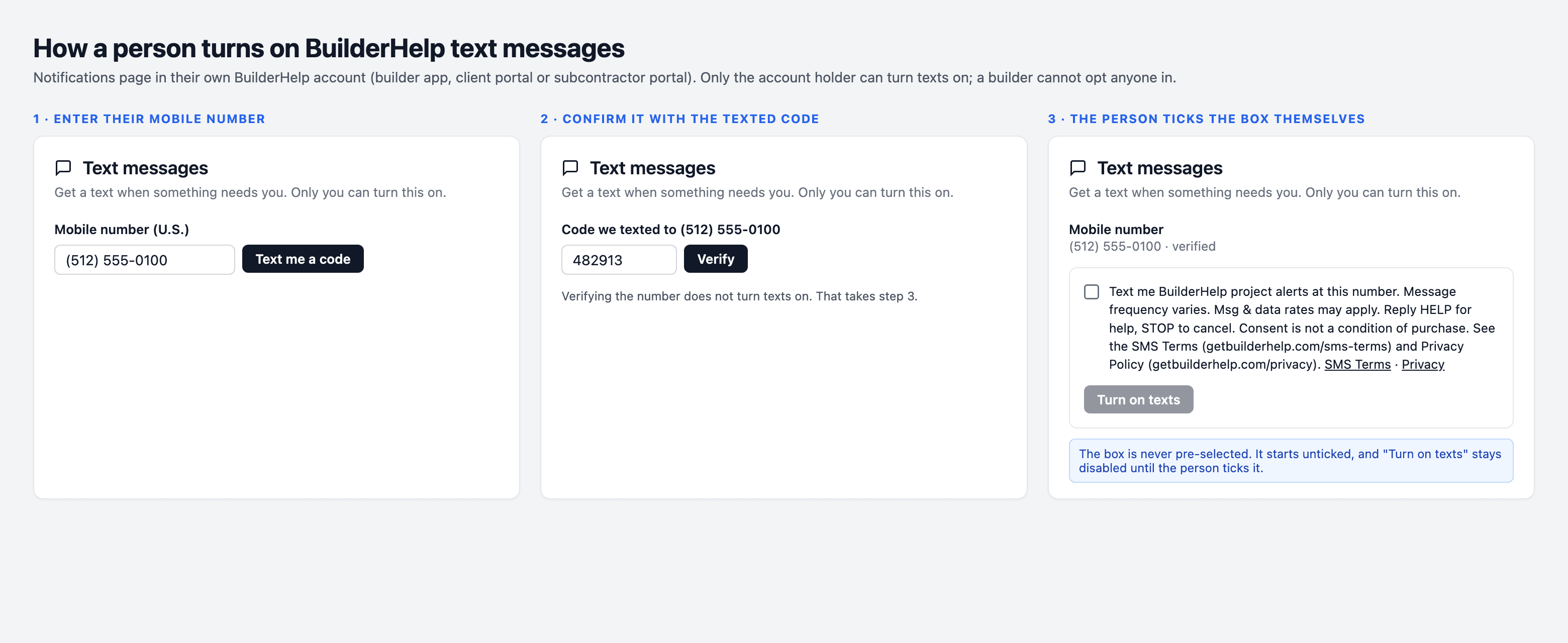
Only you can turn texts on for your phone number. You opt in by entering your mobile number in your own BuilderHelp notification settings (on the web or in the BuilderHelp app), confirming it with the code we text you, and checking the box that agrees to these terms; or by checking the text-message box on a BuilderHelp page you received a link to. A builder, subcontractor or anyone else cannot opt you in. Agreeing to texts is not a condition of any purchase or of using BuilderHelp.
3. Message Frequency and Cost
Message frequency varies with the activity on your projects and the alert types you choose. Message and data rates may apply. You can set quiet hours in your notification settings; sign-in codes you request are sent right away.
4. How to Stop or Get Help
- Reply STOP to any message to stop all texts from the program. We send one message confirming you are unsubscribed and nothing more. Replying STOP does not change your email or app notifications.
- Reply START to receive texts again.
- Reply HELP for help, or email support@builderhelp.app.
- You can also turn texts off at any time in your BuilderHelp notification settings.
5. Carriers and Delivery
Supported carriers include the major U.S. wireless carriers. Carriers are not liable for delayed or undelivered messages. Texts are sent to U.S. mobile numbers only. Delivery is not guaranteed, so project alerts are also shown in BuilderHelp and, where you have chosen it, sent by email or app notification.
6. Your Number and Privacy
If you change or give up your mobile number, turn texts off first or reply STOP so the next holder of the number does not receive your alerts. We use your mobile number and opt-in only to run this program and to secure your account. We do not sell, rent or share mobile numbers or text-message opt-in data with third parties or affiliates for their marketing or promotional purposes. See our Privacy Policy for how we handle personal information.
7. Other Terms
These SMS terms add to our Terms of Service. We may update them; the version and effective date above will change when we do.